Sign in

Get started with AI replies in Comments using Liveblocks and Next.js

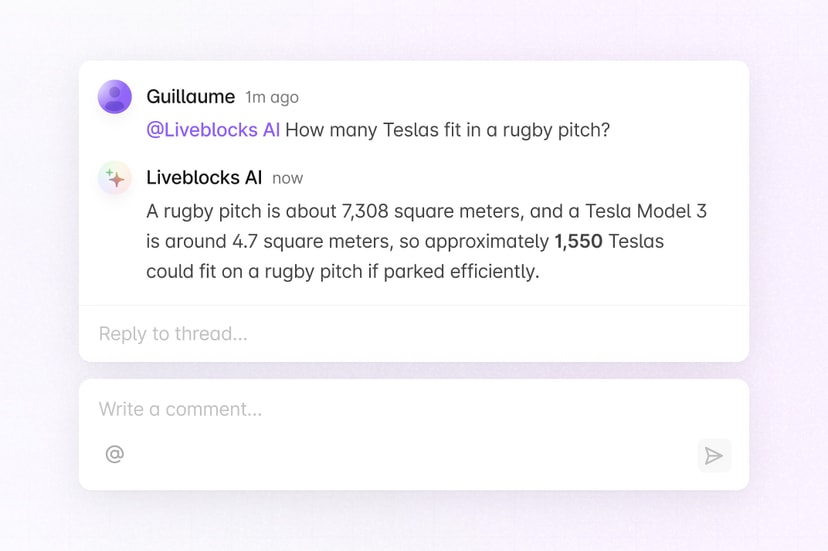
Liveblocks is a realtime collaboration infrastructure for building performant collaborative experiences. Follow the following steps to add an AI agent that replies in Comments when mentioned in a thread, using @liveblocks/node, the Vercel AI SDK, and Anthropic, in your Next.js /app directory application.

Quickstart

  1. Have a Comments app ready

    To add AI replies to comment thread, you first need to have a Liveblocks Comments app set up with secret key authentication and resolved users. Open up your app, or set up comments if you haven’t already.

    Get started with comments

  2. Install dependencies

    Install @liveblocks/node to verify webhooks and write comments, along with the Vercel AI SDK and the Anthropic provider to generate AI responses.

    Terminal
    npm install @liveblocks/node ai @ai-sdk/anthropic
  3. Add your environment variables

    Create a new .env.local file and add your Liveblocks secret key from the dashboard, your Anthropic API key from the Anthropic dashboard, and a placeholder for your Liveblocks webhook secret. You’ll create the webhook secret in the final step.

    .env.local
    LIVEBLOCKS_SECRET_KEY=""LIVEBLOCKS_WEBHOOK_SECRET_KEY="whsec_..."ANTHROPIC_API_KEY="sk-ant-..."
  4. Add an AI user to your database

    The AI agent posts replies like a regular user, so it needs a user ID and info. Add a dedicated user for your agent next to your real users. Where you resolve user info in resolveUsers and resolveMentionSuggestions, you should return this AI user so it can be @-mentioned and rendered in threads.

    Find where you fetch data in your resolver functions…
    <LiveblocksProvider  authEndpoint="/api/liveblocks-auth"  resolveUsers={async ({ userIds }) => {    const users = await fetchUsers(userIds);    // ...  }}  resolveMentionSuggestions={async ({ text }) => {    const users = await fetchAllUsers();    // ...  }}>  {children}</LiveblocksProvider>
    …and modify the return values to include an AI user
    export const AI_USER_INFO = {  id: "__AI_AGENT",  info: {    name: "AI Assistant",    avatar: "https://liveblocks.io/api/avatar?u=__AI_AGENT&agent=true",  },};
    async function fetchUsers(userIds: string[]) { const users = [];
    for (const userId of userIds) { if (userId === AI_USER_INFO.id) { users.push(AI_USER_INFO); continue; }
    const user = await (userId); users.push(user ? { id: userId, info: user.info } : undefined); }
    return users;}
    async function fetchAllUsers() { const dbUsers = await (); return [AI_USER_INFO, ...dbUsers];}
  5. Create the webhook endpoint

    Create an API route to receive Liveblocks webhooks. We’ll verify the request, only respond to commentCreated events, and ignore comments that weren’t written by a human, otherwise the AI would reply to its own messages.

    app/api/liveblocks-webhook/route.ts
    import { WebhookHandler } from "@liveblocks/node";import { NextResponse } from "next/server";import { AI_USER_INFO } from "@/app/database";import { handleAiCommentReply } from "@/app/ai-comment-reply";
    const webhookHandler = new WebhookHandler( process.env.LIVEBLOCKS_WEBHOOK_SECRET_KEY!);
    export async function POST(request: Request) { const body = await request.json();
    let event; try { event = webhookHandler.verifyRequest({ headers: request.headers, rawBody: JSON.stringify(body), }); } catch (err) { return new Response("Could not verify webhook call", { status: 400 }); }
    if (event.type === "commentCreated") { // Ignore comments posted by the AI itself if (event.data.createdBy === AI_USER_INFO.id) { return NextResponse.json({ message: "Ignored AI comment" }); }
    // Run the AI reply in the background so the webhook responds quickly handleAiCommentReply(event.data).catch(console.error); }
    return NextResponse.json({ message: "Received" });}
  6. Create an AI reply

    Next, create the AI response. There are a few steps to follow for a full user experience:

    1. Get the thread with getThread
    2. Check if the AI user was @-mentioned with getMentionsFromCommentBody.
    3. Add a “👀” reaction to the comment that mentioned the user with addCommentReaction.
    4. Show AI presence in avatar stacks and useOthers with setPresence.
    5. Create a placeholder comment, “Thinking…”, with createComment.
    6. Convert the thread into chat messages and generate a response from Claude.
    7. Update the placeholder comment with the AI response using editComment.
    app/ai-comment-reply.ts
    import { Liveblocks, getMentionsFromCommentBody } from "@liveblocks/node";import { stringifyCommentBody } from "@liveblocks/client";import { generateText, type ModelMessage } from "ai";import { anthropic } from "@ai-sdk/anthropic";import { markdownToCommentBody } from "@liveblocks/node";import { AI_USER_INFO } from "@/app/database";
    const liveblocks = new Liveblocks({ secret: process.env.LIVEBLOCKS_SECRET_KEY!,});
    export async function handleAiCommentReply(data: { roomId: string; threadId: string; commentId: string;}) { const { roomId, threadId, commentId } = data;
    // Get the thread and the comment that triggered the webhook const thread = await liveblocks.getThread({ roomId, threadId }); const comment = thread.comments.find((c) => c.id === commentId); if (!comment?.body) return;
    // Only reply if the AI user was @-mentioned const mentions = getMentionsFromCommentBody(comment.body); if (!mentions.some((m) => m.id === AI_USER_INFO.id)) return;
    // Add a “👀” reaction to the comment that mentioned the user liveblocks.addCommentReaction({ roomId, threadId, commentId, data: { emoji: "👀", userId: AI_USER_INFO.id, }, });
    // If you have an avatar stack, show AI presence for 30 secs liveblocks.setPresence(roomId, { userId: AI_USER_INFO.id, data: {}, userInfo: AI_USER_INFO, ttl: 30, });
    // Create a placeholder comment as the AI thinks const aiComment = await liveblocks.createComment({ roomId, threadId, data: { userId: AI_USER_INFO.id, body: markdownToCommentBody("Thinking…"), metadata: {}, }, });
    // Convert the thread into chat messages const messages: ModelMessage[] = await Promise.all( thread.comments.map(async (c) => ({ role: c.userId === AI_USER_INFO.id ? "assistant" : "user", content: c.body ? await stringifyCommentBody(c.body) : "Deleted comment", })) );
    // Generate a response from Claude const { text } = await generateText({ model: anthropic("claude-sonnet-4-5"), system: `You are a helpful assistant replying inside a Liveblocks comment thread.
    - Reply concisely and to the point. - Reply in plain text. Do not use markdown. - Your user ID is ${AI_USER_INFO.id}.`, messages, });
    // Update the comment with the AI response await liveblocks.editComment({ roomId, threadId, commentId: aiComment.id, data: { userId: AI_USER_INFO.id, body: markdownToCommentBody(text), metadata: {}, }, });}
  7. Set up Liveblocks webhooks

    The final step is to configure Liveblocks webhooks so the AI is notified when new comments are created.

    1. Follow the guide on testing webhooks locally.
    2. In the dashboard, create a webhook endpoint that points to /api/liveblocks-webhook and enables the commentCreated event.
    3. Copy your webhook secret (whsec_...) and add it to .env.local as LIVEBLOCKS_WEBHOOK_SECRET_KEY.

    Now whenever a user @-mentions your AI in a thread, your endpoint will generate a response and post it back as a reply.

    Set up webhooks

  8. Complete!

    You now have an AI agent capable of replying to mentions in comment threads. When it’s mentioned in a acomment, it’ll leave a placeholder comment, and edit it after generating a response.

  9. (Optional) Add streaming to AI replies

    To stream the AI’s response into the comment in realtime, like in the AI Comments example, we can take advantage of Feeds, streaming each chunk of reasoning and writing into the comment as it arrives.

    To get started, type your data in liveblocks.config.ts so the CommentMetadata, feed, and feed message types are available across your app.

    Next, extend the endpoint to write streaming updates into the feed.

    In React, render the streaming feed by creating an AiComment component that reads from useFeedMessages. It renders live status updates from the feed, including reasoning and the final response, and then switches back to the default Comment once the placeholder has been edited.

    Finally, import AiComment into your threads UI and pass it to Thread via the components.Comment override. Placeholder comments created by the workflow carry a feedId in their metadata, which is how you know when to render the streaming view instead of the default one.

What to read next

Congratulations! You’ve set up an AI agent that replies to mentions in Liveblocks Comments threads.


Examples using AI in Comments