Introducing Zen Router: our open-source type-safe router compatible with Cloudflare Workers
We’ve open sourced Zen Router: an opinionated HTTP router with typed path params, built-in body validation, and a clean model for auth. Here’s why we built it and what makes it different.
Today we’re open sourcing Zen Router, an
opinionated HTTP router powering Liveblocks over the past two years, handling
billions of requests per month. It features typed path params, built-in body
validation, and a clean model for auth. Zen Router is useful in any project that
needs an HTTP router, and is compatible with Cloudflare Workers, Bun, Node.js,
and every other modern JavaScript runtime.
This release marks the second stage of our effort to make the Liveblocks stack
available to everyone, which began last week with our
sync engine and dev server,
and continues today with Zen Router.
The Liveblocks back end runs on Cloudflare Workers, a runtime where bundle size
really matters. Ever since Liveblocks started, we’ve relied on
itty-router, the stock Cloudflare
recommendation for Workers. It’s marketed as “an ultra-tiny API microrouter”,
and that’s exactly what it is. It’s good at routing, but being so small, it
comes without any other functionality. Body validation, route param URI
decoding, auth, error handling, and CORS are entirely your responsibility.
itty-router is honest about being a minimal primitive, but each missing
feature meant we had to build our own, or use a middleware library for it. Over
time, these middlewares started to pile up, and middleware ordering became a
nightmare.
Ironically, our feature-complete router library produced a smaller bundle size
than itty-router combined with our middleware stack.
A typical back end serves endpoints to different audiences, each with its own
auth requirements: your main API might need token auth, admin routes require
stricter access control, webhook receivers verify request signatures, and some
routes like login need no auth at all.
We typically want to group routes with the same auth requirements together. And
this is at the heart of Zen Router’s design: each such group is a ZenRouter
instance.
At the outermost layer, we use
ZenRelay to bind
them all together. This is just a thin dispatch layer that looks at an incoming
request, selects which router gets to handle it purely based on the prefix, and
dispatches it.
import{ ZenRelay }from"@liveblocks/zenrouter"; import{ zen as authRoutes }from"./routes/auth";import{ zen as apiRoutes }from"./routes/api";import{ zen as adminRoutes }from"./routes/admin";import{ zen as webhookRoutes }from"./routes/webhooks"; // At the top level, Zen Relay "just" relays incoming requests to// different Zen Router instances, purely based on URL prefixconst app =newZenRelay();app.relay("/auth/*", authRoutes);// No auth (public)app.relay("/api/admin/*", adminRoutes);// Uses private authapp.relay("/api/*", apiRoutes);// Uses Bearer token auth, requires CORSapp.relay("/webhooks/*", webhookRoutes);// Uses signature verification // Now just call app.fetch(request) in your runtime’s request handler,// and it will do the restexportdefault app;
There is no fall-through here like you sometimes see in other routers. For
example, if an incoming request is for /api/admin/users/123 then only the
admin router /api/admin/* will handle it. If that router doesn’t have a
matching route, it will result in a 404 response. The /api/* router will
deliberately not get a chance to handle it. This is because each router has
its own auth requirements, so it’s important that routers are fully isolated
from each other.
The use of ZenRelay is optional. If your back end only needs one ZenRouter
instance, you don’t need ZenRelay at all and you can use that ZenRouter
instance directly.
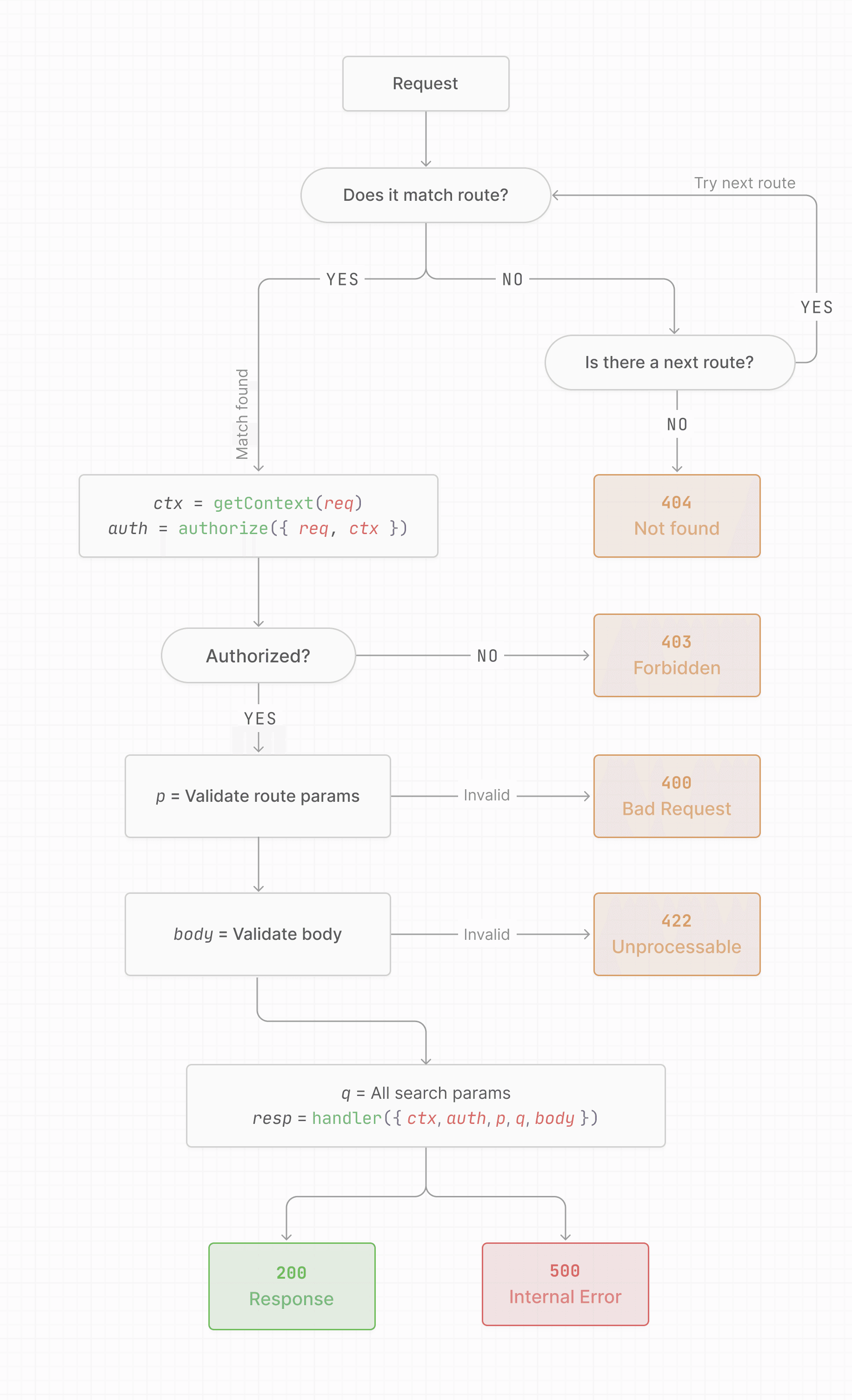
Each router has a set of routes, and two important hooks: getContext and
authorize. The return values of these functions become available in the
handler.
exportconst zen =newZenRouter({// Optional context is any metadata you want to attach to an incoming requestgetContext:(req)=>({ foo:"bar"}), // Authorization is mandatoryauthorize:async({ req })=>{const token = req.headers.get("Authorization");const user =await db.getUserByToken(token);if(!user)returnfalse;// → 403 Forbidden // Return any truthy value to allow// For example, the full authorized user objectreturn{ currentUser: user };},}); zen.route("GET /api/users/me",({ ctx, auth })=>{return{ id: auth.currentUser.id, name: auth.currentUser.name, metadata: ctx.foo,};}); zen.route("GET /api/users/<userId>",async({ p })=>{const user =await db.getUserById(p.userId);return{ id: user.id, name: user.name,};});
Authorization is mandatory. Every router must provide an authorize
function that will be evaluated before any route handler runs. Return a falsy
value or throw to reject the request with a 403 response. Return any truthy
value to allow the request, and that value becomes available as auth in the
handler.
Providing getContext is optional. You can return any value from it, and it
will be made available to handlers as ctx. This is a great place to pass down
database connections or structured loggers.
Path params are typed automatically. A route pattern like GET /api/users/<userId> makes p.userId available as a typed string in the handler, inferred from the pattern at compile time. No extra type declarations needed. You can also register custom param schemas at the router level to transform params to other types or restrict their allowed values.
Routes that accept a request body must declare a validator as their second
argument. The body is validated before your code executes, so body is already
parsed and fully typed.
import{ z }from"zod"; zen.route("PATCH /api/users/me", // Expected incoming request body shape z.object({ name: z.string()}), async({ auth, body })=>{await db.updateUser(auth.currentUser.id,{ name: body.name,});return{ ok:true};});
If the body doesn’t match the schema, Zen Router returns an HTTP 422
Unprocessable Entity response with a human-readable error message.
At Liveblocks, we use decoders for validation because
it’s more lightweight and produces more beautiful error messages than Zod.
However, Zen Router supports any validation library that implements the
Standard Schema spec.
CORS support is a first-class feature. Passing
{ cors: true } to the router
enables it across all routes, and Zen Router will correctly handle all OPTIONS preflight requests automatically.
For more control, pass a configuration object instead to set allowed origins,
credentials, exposed headers, and more. Either way, CORS is per-router, not
per-route, which matches how you’d almost always want it. In our case, only the
main API router needs CORS since it’s the only one browsers talk to
directly.
From inside any handler, you can short-circuit with an error response:
import{ abort }from"@liveblocks/zenrouter"; // Returns { "error": "Not Found" } with status 404abort(404);
The error shape that abort() produces can be customized centrally at the
router level with
onError and onUncaughtError
hooks, so individual handlers don’t need to worry about it.
Zen Router supports
OpenTelemetry. Use your
favorite OpenTelemetry package, then tell Zen Router how to get the current
span, and Zen Router will automatically set the matched route pattern and path
params as span attributes. This means you get per-route observability for free
with a single config option.
Zen Router was founded on the principles laid out in its
documentation, optimized for type-safety, long-term
maintainability, and joy to use. Zen Router values explicitness over
implicitness, always, everywhere.
Some of these principles may feel unconventional at first, but they have really
made endpoint development a joy to us.
Auth is mandatory. For public routes, explicitly opt out.
All route paths are fully qualified and greppable. No prefix-based
sub-routers. A grep for /api/users returns every route that touches that
path, unambiguously.
All route paths include the HTTP method. The method and path are a single
string, which lets the router automatically return 405 Method Not Allowed
when a URL matches but the method doesn’t.
No middlewares. Auth and context are the only hooks. No middleware
ordering, no implicit state.
No request monkey patching, ever. Metadata, the current user, validated
bodies, route params, and query params are passed alongside the original
request, not attached to it.
No fall-through between routers. Each relay prefix maps to exactly one
router.
CORS is built-in, not bolted on as a middleware.
Throwing is first-class flow control. Call abort() to short-circuit the
handler and return an error response.