• DocsDocs
  • PricingPricing
Book a demo
Sign in
Sign in
Book a demo
    • Ready-made features
      • AI Copilots
        AI Copilots

        In-app AI agents that feel human

      • Comments
        Comments

        Contextual commenting

      • Multiplayer Editing
        Multiplayer Editing

        Realtime collaboration

      • Notifications
        Notifications

        Smart alerts for your app

      • Presence
        Presence

        Realtime presence indicators

    • Platform
      • Monitoring Dashboard
        Monitoring Dashboard

        Monitor your product

      • Realtime Infrastructure
        Realtime Infrastructure

        Hosted WebSocket infrastructure

    • Tools
      • Examples

        Gallery of open source examples

      • Showcase

        Gallery of collaborative experiences

      • Next.js Starter Kit

        Kickstart your Next.js collaborative app

      • DevTools

        Browser extension for debugging

      • Tutorial

        Step-by-step interactive tutorial

      • Guides

        How-to guides and tutorial

    • Company
      • Blog

        The latest from Liveblocks

      • Customers

        The teams Liveblocks empowers

      • Changelog

        Weekly product updates

      • Security

        Our approach to security

      • About

        The story and team behind Liveblocks

  • Docs
  • Pricing
  • Ready-made features
    • AI Copilots
    • Comments
    • Multiplayer Editing
    • Notifications
    • Presence
    Platform
    • Monitoring Dashboard
    • Realtime Infrastructure
    Solutions
    • People platforms
    • Sales tools
    • Startups
    Use cases
    • Multiplayer forms
    • Multiplayer text editor
    • Multiplayer creative tools
    • Multiplayer whiteboard
    • Comments
    • Sharing and permissions
    • Document browsing
  • Resources
    • Documentation
    • Examples
    • Showcase
    • React components
    • DevTools
    • Next.js Starter Kit
    • Tutorial
    • Guides
    • Release notes
    Technologies
    • Next.js
    • React
    • JavaScript
    • Redux
    • Zustand
    • Yjs
    • Tiptap
    • BlockNote
    • Slate
    • Lexical
    • Quill
    • Monaco
    • CodeMirror
  • Company
    • Pricing
    • Blog
    • Customers
    • Changelog
    • About
    • Contact us
    • Careers
    • Terms of service
    • Privacy policy
    • DPA
    • Security
    • Trust center
    • Subprocessors
  • HomepageSystem status
    • Github
    • Discord
    • X
    • LinkedIn
    • YouTube
    © 2025 Liveblocks Inc.
Blog/Updates

What's new in Liveblocks: November 2025

We've released a new hook for searching through comments, a way to customize comment menu items, and new Yjs guides.

on December 9th
What's new in Liveblocks: November 2025
December 9th·4 min read
Share article

This November, we’ve added new features to Comments.

  • Search through comments: New hook for finding comments within the room.
  • Comment dropdown customization: Add custom menu items to threads.
  • Yjs guides: Best practices when using Yjs, how tombstones work, and more.

Upgrade now

To use the latest features, update your packages with the following command.

$npx create-liveblocks-app@latest --upgrade

If you were previously on Liveblocks 3.10 or below, make sure to follow our upgrade guides before updating.

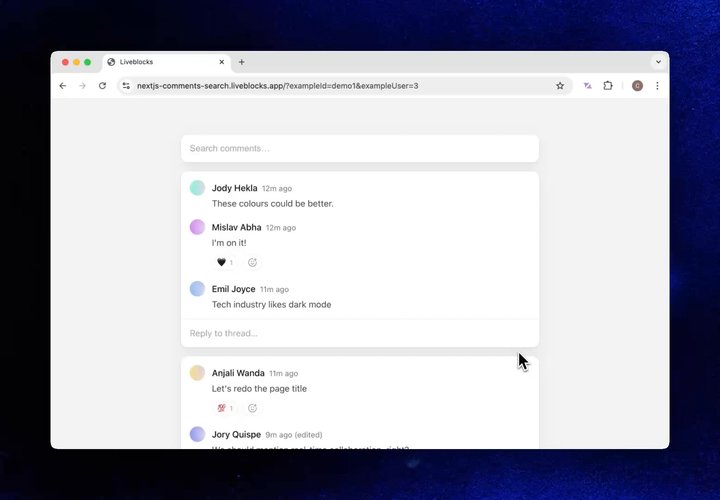
Search through comments

When using Comments, you can now add a search bar to your application in a few lines of code. The new feature allows you to search comments semantically, meaning that results are found based on meaning, not exact words—for example a query for “marketing” will bring up results for “email campaign.”

Your browser does not support the video tag.Comments search blog

Set it up by using the new useSearchComments hook, passing the user’s query to query.text. The hooks returns a list of matching comments that are inside the current room.

const { results, error, isLoading } = useSearchComments({  query: { text: "fruit" },});
// [{ content: "I like apples", threadId: "th_xxx", commentId: "cm_xxx" }, ...]console.log(results);

You can also use more advanced filters to narrow down results, such as threadMetadata, hasAttachments, and more. Here’s a snippet showing a full search component with a “Resolved threads” toggle option.

function Search() {  const [text, setText] = useState("");  const [threadResolved, setThreadResolved] = useState(false);
const { results, error, isLoading } = useSearchComments({ query: { text, threadResolved }, });
return ( <> {/* Search terms */} <input value={text} onChange={(e) => setInput(e.target.value)} />
{/* Toggle resolved threads */} <label> <input type="checkbox" checked={threadResolved} onChange={(e) => setThreadResolved(e.target.checked)} /> Resolved threads </label>
{/* Search results */} {results.map((result) => ( <a href={"#" + result.commentId}>{result.content}</a> ))} </> );}

Learn more in our documentation under useSearchComments.

Comment dropdown customization

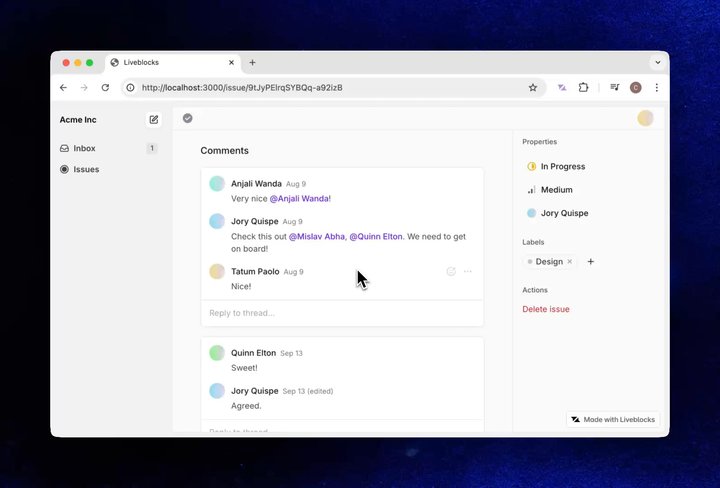
You can now customize the dropdown menu alongside comments. Add new actions, links, or replace default items entirely. Below you can see an example of this—the “Ask AI” and “Copy link” items have been added.

Your browser does not support the video tag.Comments dropdown blog

To add items, use the commentDropdownItems prop on Thread, or dropdownItems on Comment. Inserting children into the JSX places the default dropdown components, so you can extend instead of replace them, as we are below.

<Thread  thread={thread}  commentDropdownItems={({ children, comment }) => (    <>      {/* Custom "Copy link" item */}      <Comment.DropdownItem        onSelect={() => {          navigator.clipboard.writeText(            `${window.location.href}#${comment.id}`          );        }}        icon=<Icon.Copy />      >        Copy link      </Comment.DropdownItem>
{/* Default items */} {children} </> )}/>

You can find a live example of a custom dropdown item on our Linear-like issue tracker. To learn more, read our docs section on commentDropdownItems.

Yjs guides

We’ve added four new guides to help you better understand Yjs and how it works with Liveblocks.

  • Yjs best practices and tips: Build your app in an efficient, error-free way.
  • Tiptap best practices and tips: Catch problems and avoid common pitfalls.
  • Why you can’t delete Yjs documents: The role of tombstones in Yjs.
  • Can I use my own database with Yjs?: Synching with webhook events.

Minor improvements

  • Update type definitions for provider models to support GPT-5.1 variants.
  • Fix regression: handle rejection messages from the server again.
  • Updated Next.js Starter Kit to use Tiptap v3 and BlockNote 0.42.
  • Fix a bug where a fresh provider is required by Lexical in order to initialize properly by always requesting a new provider in the factory function.
  • Tweak reconnection logic to not retry on specific 400 level error codes.
  • Prevents certain 400 level errors from being reported as a 403.
  • Fix scroll issues in some scenarios where AiChat would be rendered but hidden.
  • Support for Tiptap v3 in @liveblocks/react-tiptap.
  • Renamed "Liveblocks notifications" to "Collaboration notifications" to better reflect that these are notifications about collaboration activity (like threads and mentions) that Liveblocks sends on your behalf. Notification kinds thread and textMention are now called "Collaboration" kinds.

Upgrade

To use these latest features, update your packages with:

$npx create-liveblocks-app@latest --upgrade

Contributors

Contributors include:ctnicholasnvienimeshnayajuofoucherotmarcbouchenoirepierrelevaillantjrownymmavko

8 authors

Product updatesCommentsDocumentation

Ready to get started?

Join thousands of companies using Liveblocks ready‑made collaborative features to drive growth in their products.

Book a demo

Related blog posts

  • What's new in Liveblocks: October 2025

    What's new in Liveblocks: October 2025

    Picture of Chris Nicholas
    November 13th
    Updates
  • What's new in Liveblocks: August 2025

    What's new in Liveblocks: August 2025

    Picture of Chris Nicholas
    September 17th
    Updates
  • What’s new in Liveblocks: July 2025

    What’s new in Liveblocks: July 2025

    Picture of Chris Nicholas
    August 5th
    Updates