• DocsDocs
  • PricingPricing
Sign in
Get started
Sign in
Get started
    • Realtime Infrastructure
      • Presence
        Presence

        Online users, cursors, selections

      • Broadcast
        Broadcast

        Temporary event signals

      • Storage
        Storage

        Synced conflict-free data

      • Feeds
        FeedsBeta

        Messages and activity logs

      • Threads
        Threads

        Contextual conversations

    • Collaboration features
      • Multiplayer
        Multiplayer

        Realtime collaboration

      • Comments
        Comments

        Contextual commenting

      • Notifications
        Notifications

        Smart alerts for your app

      • AI Copilots
        AI Copilots

        Individual AI assistants

    • Tools
      • Examples

        Gallery of open source examples

      • Showcase

        Gallery of collaborative experiences

      • Next.js Starter Kit

        Kickstart your Next.js collaborative app

      • DevTools

        Browser extension

      • Tutorial

        Step-by-step interactive tutorial

      • Guides

        How-to guides and tutorial

      • Figma UI Kit

        Liveblocks Collaboration Kit

    • Company
      • Blog

        The latest from Liveblocks

      • Customers

        The teams Liveblocks empowers

      • Changelog

        Weekly product updates

      • Security

        Our approach to security

      • About

        The story and team behind Liveblocks

  • Docs
  • Pricing
  • Realtime Infrastructure
    • Presence
    • Broadcast
    • Storage
    • FeedsBeta
    • Threads
    Collaborative features
    • Multiplayer
    • Comments
    • Notifications
    • AI Copilots
    Solutions
    • People platforms
    • Sales tools
    • Startups
    Use cases
    • Multiplayer forms
    • Multiplayer text editor
    • Multiplayer creative tools
    • Multiplayer whiteboard
    • Comments
    • Sharing and permissions
    • Document browsing
  • Resources
    • Documentation
    • Examples
    • Showcase
    • DevTools
    • React components
    • Next.js Starter Kit
    • Tutorial
    • Guides
    • Release notes
    Technologies
    • Next.js
    • React
    • JavaScript
    • Redux
    • Zustand
    • Yjs
    • Tiptap
    • BlockNote
    • Slate
    • Lexical
    • Quill
    • Monaco
    • CodeMirror
  • Company
    • Pricing
    • Blog
    • Customers
    • Changelog
    • About
    • Contact us
    • Careers
    • Terms of service
    • Privacy policy
    • DPA
    • Security
    • Trust center
    • Subprocessors
  • HomepageSystem status
    • Github
    • Discord
    • X
    • LinkedIn
    • YouTube
    © 2026 Liveblocks Inc.
Blog/Updates

Multiplayer SDK for React Flow: Realtime collaboration between humans and agents

We’ve released a new integration for React Flow, enabling realtime collaboration in workflows, flowcharts, and node-based apps in just a few lines of code.

on April 7th
Multiplayer SDK for React Flow: Realtime collaboration between humans and agents
April 7th·6 min read
Share article
Product updatesOpen sourceAI

Ready to get started?

Join thousands of companies using Liveblocks to build multiplayer experiences for people and agents.

Get started for free

Related blog posts

  • AI agents are becoming native users of software

    AI agents are becoming native users of software

    Picture of Steven Fabre
    April 6th
    Updates
  • Introducing Feeds and APIs for Agent Workflows

    Introducing Feeds and APIs for Agent Workflows

    Picture of Steven Fabre
    April 6th
    Updates
  • What's new in Liveblocks: February 2026

    What's new in Liveblocks: February 2026

    Picture of Chris Nicholas
    March 16th
    Updates

Today, we’re introducing a new SDK for React Flow that allows you to build realtime multiplayer flowcharts in just a few lines of code, enabling collaboration between humans and agents. It also enables powerful collaborative features like live cursors, multiplayer undo/redo, and pinned comment threads.

Terminal
$npm install @liveblocks/react-flow

Multiplayer React Flow

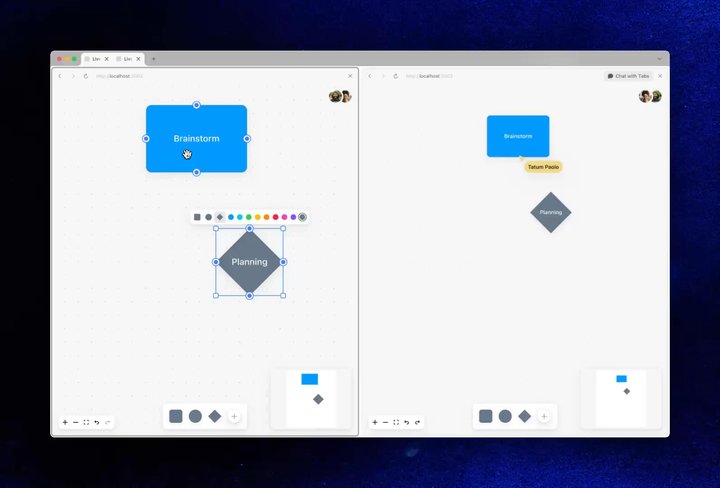
React Flow is a customizable React component for building node-based editors, workflows, and interactive diagrams. Our new integration stores your flowchart state and synchronizes it between users in realtime, allowing you to build new collaborative apps, or add multiplayer to your existing ones.

Your browser does not support the video tag.Multiplayer React Flow with Liveblocks

To get started, connect to a multiplayer Liveblocks room, import useLiveblocksFlow, and pass its properties to the ReactFlow component. Additionally, you can render live presence cursors for each user by importing Cursors.

import { useLiveblocksFlow, Cursors } from "@liveblocks/react-flow/suspense";
function Flowchart() { const { nodes, edges, onNodesChange, onEdgesChange, onConnect } = useLiveblocksFlow();
return ( <ReactFlow nodes={nodes} edges={edges} onNodesChange={onNodesChange} onEdgesChange={onEdgesChange} onConnect={onConnect} > <Cursors /> </ReactFlow> );}

Initial state

Your flowchart can start with an initial set of shapes and connections, which is set by passing nodes and edges to useLiveblocksFlow as the first argument.

const { nodes, edges /* ... */ } = useLiveblocksFlow({  nodes: {    initial: [      {        id: "node-1",        type: "input",        data: { showPreview: true },        position: { x: 250, y: 25 },      },      // ...    ],  },
edges: { initial: [ { id: "e1-2", source: "node-1", target: "node-2" }, // ... ], },});

Learn more in our React Flow documentation.

Custom nodes and local properties

You can define custom nodes in your React Flow app like normal, and data will be automatically synchronized between users. However, you may wish for some properties to be kept local and singleplayer. An example would be a showPreview property, which might be used to toggle some kind of preview UI inside a node.

To make a property like showPreview singleplayer only, add it to the sync object, and set it to false.

const { nodes, edges /* ... */ } = useLiveblocksFlow({  nodes: {    initial: [      {        id: "node-1",        type: "input",        data: { showPreview: true },        position: { x: 250, y: 25 },      },      // ...    ],
// Keep `showPreview` local in "input" nodes sync: { input: { showPreview: false }, }, },
edges: { /* ... */ },});

Find more information on custom nodes and local properties.

Infrastructure out of the box

React Flow is powered by Liveblocks Storage under the hood, our battle-tested sync engine and datastore, meaning you can take advantage of its existing features right out of the box. On the front end, one such feature is undo/redo, which extends React Flow’s existing functionality.

Your browser does not support the video tag.Multiplayer undo/redo in React Flow

Multiplayer undo/redo is trivial to implement with the useUndo and useRedo hooks from @liveblocks/react.

import { useUndo, useRedo } from "@liveblocks/react/suspense";
function Toolbar() { const undo = useUndo(); const redo = useRedo();
return ( <div> <button onClick={undo}>↩️ Undo</button> <button onClick={redo}>↪️ Redo</button> </div> );}

Front end features

Around 100 React hooks with various functionality are available, for example:

  • useOthers: Create live avatar stacks and custom presence.
  • useThreads: Add threaded commenting to your flow (example).
  • useSyncStatus: Get React Flow sync status and show a spinner.
  • useLostConnectionListener: Gracefully handle poor connections.
  • useBroadcastEvent: Broadcast custom realtime events to connected users.

We also provide React components, DevTools extensions, and text editors.

Back end features

On the back end, Liveblocks has a Node.js SDK, REST API, and webhooks, which allow you to fetch and edit your React Flow state, and trigger events when it’s modified.

Alongside REST API functions and methods, you can also trigger changes when the React Flow document is modified using our storageUpdated webhook. Additionally, you can check your documents in the dashboard, and develop/test locally using our dev server.

Integrate realtime AI agents

Liveblocks allows AI agents to collaborate with other agents and humans in realtime. Recently we released new APIs for presence which can be used to display live AI cursors in your application, and combined with server-side editing, you can create an AI agent that collaborates like a human.

Your browser does not support the video tag.AI agent editing a flowchart

AI editing requires multiplayer

True conflict-resolved multiplayer is required for AI agents to edit simultaneously with other users, otherwise changes will be lost. Liveblocks Storage is a sync engine designed specifically for this use case, enabling seamless editing.

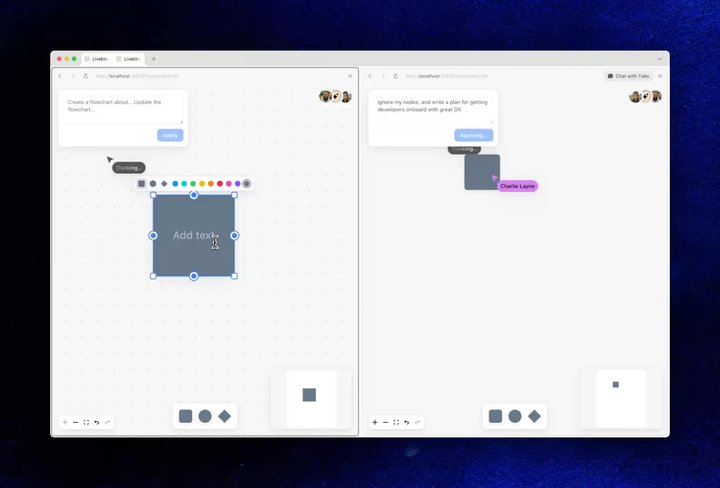
Your browser does not support the video tag.A human and AI agent simultaneously editing a flowchart

Multiple users can even edit the same node at the same time, and changes will be merged and resolved automatically.

Coming soon: simple server-side editing

Server-side editing is already possible via mutateStorage, but later this month we’ll be releasing new back end APIs designed specifically for React Flow and AI, making realtime server-side editing easier than it is today.

await mutateFlow({ client, roomId }, (flow) => {  flow.addNode({    id: "node-3",    type: "input",    data: { showPreview: true },    position: { x: 100, y: 50 },  });
flow.updateEdgeData("e2-3", { color: "#ff5349", });});

Follow us on X, LinkedIn, and Bluesky for updates on this.

Examples

We’ve created three new examples to help you get started with React Flow and Liveblocks. Try the live demos below.

Collaborative flowchart builder

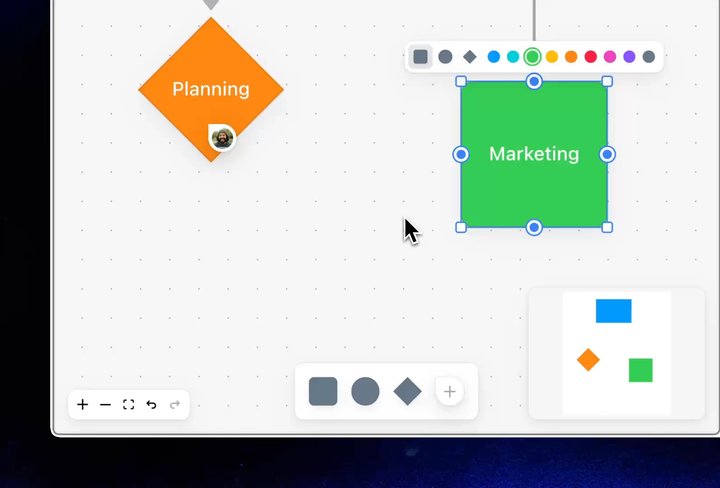
A flowchart builder that allows you to place different elements on the page. Elements’ colors and shapes can be changed, and connections can be made between them. It also features comment pins, undo/redo, and live cursors.

Loading

Our Collaborative Flowchart Builder example

Collaborative flowchart AI

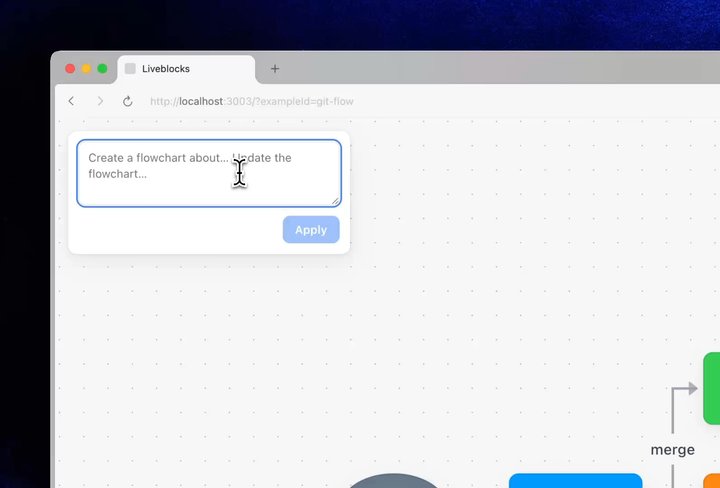
A flowchart builder similar to the previous example, but with an AI editing dialog box. Try asking it to “make the chart horizontal” to watch it work.

Loading

Our Collaborative Flowchart AI example

Collaborative flowchart

A basic read-only setup with collaborative editing and a custom interactive node.

Loading

Our Collaborative Flowchart example

Get started now

To get started with React Flow, follow our new quickstart guide for Next.js.

Get started now

Contributors

Contributors include:sugardariusmarcbouchenoirenvie

3 authors