• DocsDocs
  • PricingPricing
Sign in
Get started
Sign in
Get started
    • Products
      • Sync
        Sync

        The sync engine for the agentic web

      • Comments
        Comments

        Contextual commenting

      • Notifications
        Notifications

        Smart alerts for your app

    • Platform
      • Realtime infrastructure

        Multiplayer sync for people and AI

      • SDKs & integrations

        Client libraries and framework adapters

      • Security & compliance

        SOC 2, HIPAA, GDPR

    • Agentic users

      Build agentic experiences

    • AI activity feed

      Surface AI activity in your app

    • Canvas

      Build collaborative canvases

    • Chat

      Create realtime chat experiences

    • Code editor

      Build collaborative coding experiences

    • Comments

      Add contextual discussion

    • Custom app

      Start with flexible building blocks

    • Forms

      Collect input together

    • Flowchart

      Diagram together

    • Inbox

      Keep users informed

    • Presence

      Show who is online

    • Slideshow

      Present together

    • Spreadsheet

      Collaborate on data

    • Text editor

      Edit documents together

    • Industries
      • Human resources

        Collaboration for HR & talent tools

      • Security & compliance

        Collaborative reviews for audits & evidence

      • Sales & marketing tools

        Engaging features that help sellers sell

      • Healthcare

        HIPAA-ready collaboration for care teams

      • Creative tools

        Multiplayer canvases for people & AI

      • Legal

        Secure drafting for firms & clients

      • AEC

        Collaboration for design & construction

      • Education

        Interactive realtime learning experiences

    • Users
      • Enterprise

        Realtime collaboration without a rewrite

      • Innovation

        Validate and ship multiplayer bets fast

      • Startups

        Build multiplayer products from day one

      • Individual builders

        Prototype multiplayer apps in minutes

    • Tools
      • Examples

        Gallery of open source examples

      • Showcase

        Gallery of collaborative experiences

      • Next.js Starter Kit

        Kickstart your Next.js collaborative app

      • DevTools

        Browser extension

      • Tutorial

        Step-by-step interactive tutorial

    • Company
      • Blog

        The latest from Liveblocks

      • Customers

        The teams Liveblocks empowers

      • Changelog

        Weekly product updates

      • About

        The story and team behind Liveblocks

  • Docs
  • Pricing
  • Products
    • Sync
    • Comments
    • Notifications
    Platform
    • Realtime Infrastructure
    • SDKs & integrations
    • Security & compliance
    Solutions
    • Human resources
    • Security & compliance
    • Sales & marketing tools
    • Healthcare
    • Creative tools
    • Legal
    • AEC
    • Education
    • Enterprise
    • Innovation
    • Startups
    • Individual builders
  • Use cases
    • Agentic users
    • AI activity feed
    • Canvas
    • Chat
    • Code editor
    • Comments
    • Custom app
    • Forms
    • Flowchart
    • Inbox
    • Presence
    • Slideshow
    • Spreadsheet
    • Text editor
    Technologies
    • Next.js
    • React
    • JavaScript
    • Redux
    • Zustand
    • Yjs
    • Tiptap
    • BlockNote
    • SuperDoc
    • Slate
    • Lexical
    • Quill
    • Monaco
    • CodeMirror
  • Resources
    • Documentation
    • Examples
    • Showcase
    • DevTools
    • React components
    • Next.js Starter Kit
    • Tutorial
    • Guides
    • Release notes
    Company
    • Pricing
    • Blog
    • Customers
    • Changelog
    • About
    • Contact us
    • Careers
    • Terms of service
    • Privacy policy
    • DPA
    • Security
    • Trust center
    • Subprocessors
  • HomepageSystem status
    • Github
    • Discord
    • X
    • LinkedIn
    • YouTube
    © 2026 Liveblocks Inc.
Blog/Updates

LiveText: a new data type for collaborative text editing

Introducing LiveText, a new primitive for adding realtime multiplayer to rich-text editors. An alternative to Yjs, it supports Tiptap, BlockNote, ProseMirror, and CodeMirror.

Picture of Chris Nicholas
Chris Nicholas on September 1st
LiveText: a new data type for collaborative text editing
September 1st·9 min read
  • Picture of Chris NicholasChris Nicholas
Share article
Product updatesText editingStorageSyncMultiplayer

Ready to get started?

Join thousands of companies using Liveblocks to build multiplayer experiences for people and agents.

Get started for free

Related blog posts

  • Introducing Liveblocks Sync: the sync engine for the agentic web

    Introducing Liveblocks Sync: the sync engine for the agentic web

    Picture of Chris Nicholas
    September 1st
    Updates
  • What's new in Liveblocks: July 2026

    What's new in Liveblocks: July 2026

    Picture of Chris Nicholas
    August 4th
    Updates
  • LiveFile: upload and share files in collaborative apps

    LiveFile: upload and share files in collaborative apps

    Picture of Chris Nicholas
    July 27th
    Updates

Today, we’re introducing LiveText, a new data type for Liveblocks Sync, that enables collaborative text editing, without Yjs. It currently supports four popular rich-text and code editors, and has a number of advantages over alternative solutions, including its simplicity and smaller document size.

Collaborative editing

Text documents are central to how people work together, being used for project briefs, notes, planning, and more. Traditionally, when two people edit a text document at the same time, whoever presses save last will overwrite the other’s changes. With collaborative text editing, multiple users can edit a document in realtime, and their changes are merged together, without losing any data.

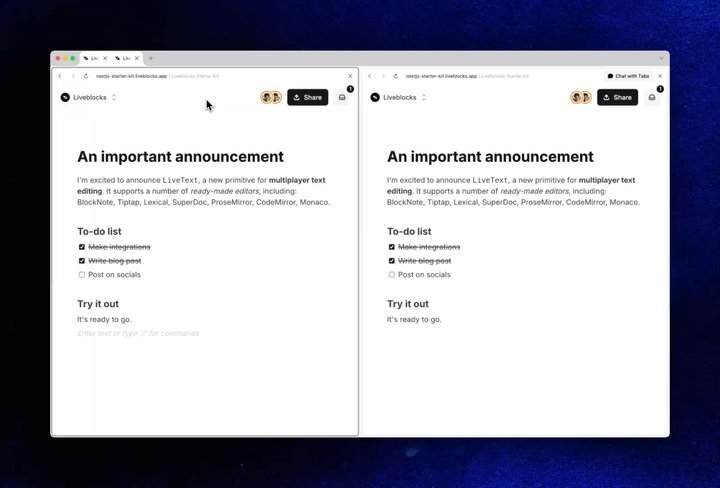
Your browser does not support the video tag.Blocknote demo

A block-based editor in our Next.js Starter Kit, powered by BlockNote and LiveText.

Setting up collaborative text editing is already simple with Yjs, but this solution has always had flaws. That’s why we’ve built a new and improved alternative, LiveText.

Introducing LiveText

Our sync engine for building collaborative applications, Liveblocks Sync, now has native support for multiplayer text editing with LiveText. It’s quicker, simpler, and more efficient than Yjs, and shares the same undo/redo stack as the rest of your Liveblocks app.

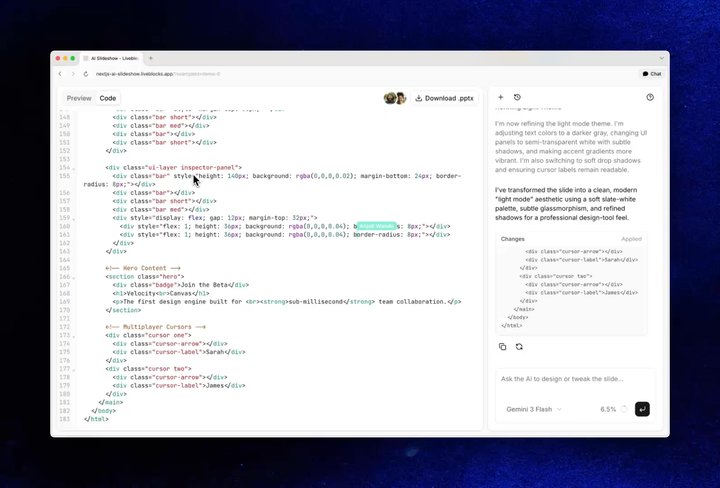
Your browser does not support the video tag.AI slideshow example

Our AI slideshow example, featuring a CodeMirror editor powered by LiveText.

We’ve also built a number of integrations for popular text and code editors, allowing you to get started in minutes.

Text editor integrations

LiveText ships with integrations for four different editors. Each has its own unique features and use cases, but all support collaborative text editing:

  • Tiptap: A headless rich-text editor framework built on ProseMirror.
  • BlockNote: A block-based rich-text editor for Notion-style documents.
  • ProseMirror: A toolkit for building custom rich-text editors.
  • CodeMirror: An extensible code editor for the browser.

Each link above takes you to the API reference for the editor’s integration package.

Basic setup

The code is simple for each editor, just needing a simple extension.

import { useLiveblocksExtension } from "@liveblocks/react-tiptap";import { useEditor, EditorContent } from "@tiptap/react";import StarterKit from "@tiptap/starter-kit";
export function Editor() { const liveblocks = useLiveblocksExtension({ collaborationMode: "liveblocks", });
const editor = useEditor({ extensions: [ liveblocks, StarterKit.configure({ undoRedo: false }), ], });
return <EditorContent editor={editor} />;}

Multiple documents

Each editor integration supports multiple documents per room, allowing you to render them all on the same page. To do this, for example with Tiptap, you pass a field property as a unique identifier for the document.

import { useLiveblocksExtension } from "@liveblocks/react-tiptap";
function TextEditor() { const liveblocks = useLiveblocksExtension({ field: "editor-one", collaborationMode: "liveblocks", });
// ...}

You can then iterate over the fields and create an editor for each field.

import { useStorage, shallow } from "@liveblocks/react/suspense";
function TextEditors() { const fields = useStorage( (root) => Object.keys(root._tiptap_docs ?? {}), shallow );
return fields.map((field) => <TextEditor key={field} field={field} />);}

Find all multiplayer get started guides in our documentation.

Editing as a primitive

You don’t need to use a specific editor to use LiveText, even though that is the easiest way to get started. Because it’s a conflict-free data type like LiveObject, LiveList, and LiveMap, you can add it to your data storage tree and read/edit it like any other data.

Defining a LiveText property

You can define a new value with the LiveText constructor. In this example, a multiplayer room is initialized, and the myText property is defined with a default value of “Hello”.

import { RoomProvider } from "@liveblocks/react";import { LiveText } from "@liveblocks/client";
function App() { return ( <RoomProvider roomId="my-room-id" initialStorage={{ myText: new LiveText("Hello") }} > {/* ... */} </RoomProvider> );}

Reading a value

You can read a LiveText value with useStorage. In this example, the text is read from the myText property.

import { useStorage } from "@liveblocks/react/suspense";
function ReadText() { const myText = useStorage((root) => root.myText);
// [["Hello"]] console.log(myText);
// ...}

Modifying a value

You can modify a LiveText value inside useMutation with the insert method. In this example, the text is transformed from “Hello” to “Hello world”.

import { useMutation } from "@liveblocks/react/suspense";
function EditText() { const editText = useMutation(({ storage }) => { const myText = storage.get("myText"); myText.insert(myText.length, " world"); }, []);
// ...}

Formatting text

Formatting can be applied to each segment of the text when modifying it, using format. In this example, the text is transformed from “Hello world” to “Hello world”.

import { useMutation } from "@liveblocks/react/suspense";
function FormatText() { const formatText = useMutation(({ storage }) => { const myText = storage.get("myText"); myText.format(0, 5, { bold: true });
// [["Hello", { bold: true }], [" world"]] console.log(myText); }, []);
// ...}

Deeply nested trees

LiveText can be deeply nested inside other data types, such as LiveObject, LiveList, and LiveMap. This allows you to create complex, dynamic data trees that multiple users can edit in realtime. In this example, an app has a LiveList of pages, and each page’s LiveText content is stored inside a LiveObject.

import { useMutation } from "@liveblocks/react/suspense";import { LiveList, LiveObject, LiveText } from "@liveblocks/client";
function Pages() { const setUpPages = useMutation(({ storage }) => { const pages = new LiveList([]); storage.set("pages", pages);
const newPage = new LiveObject({ id: "my-first-page", content: new LiveText("Hello world"), timestamp: Date.now(), });
pages.push(newPage); }, []);
// ...}

Each page’s content can then be read with useStorage, and looped through.

import { useStorage } from "@liveblocks/react/suspense";
function FirstPage() { const pages = useStorage((root) => root.pages);
return ( <div> {pages.map((page) => ( <Page key={page.id} content={page.content} /> ))} </div> );}

Make sure to set your TypeScript config to make it easy to build complex data storage trees.

Agentic and server-side editing

As existing apps become places where humans and agents work together, it was important for us to enable agentic editing of text. Using existing APIs for Liveblocks Sync, you can create AI agents that can edit LiveText content from the back end. This is possible using mutateStorage, which works similarly to useMutation.

import { Liveblocks } from "@liveblocks/node";import { openai } from "@ai-sdk/openai";import { generateText } from "ai";
const liveblocks = new Liveblocks({ secret: "sk_prod_xxxxxxxxxxxxxxxxxxxxxxxx",});
const { text } = await generateText({ model: openai("gpt-5.6-sol"), prompt: `Write a document about realtime collaboration`,});
await liveblocks.mutateStorage("my-room-id", ({ root }) => { const myText = root.get("myText"); myText.insert(0, text);});

Editing with JSON Patch

An alternative method for editing text on the server is to use JSON Patch. This is a standard format for describing changes to a JSON document, and LiveText supports it. For example, the snippet below replaces the first segment of the text with “Hello”, and then makes it bold.

[  { "op": "replace", "path": "/myText/data/0/0", "value": "Hello" },  { "op": "add", "path": "/myText/data/0/1", "value": { "bold": true } }]

Learn more in our guide on modifying data storage with JSON Patch.

Why we made a Yjs alternative

Until now, text editing in Liveblocks has been powered by Yjs, a CRDT library. CRDTs are designed so that every client can merge every edit independently, without a central server. It’s clever technology, but that independence has a cost; because to merge correctly, a CRDT document must remember its past.

Deleted content leaves behind tombstones, hidden markers that stay in the document forever, so a Yjs document grows with every edit, even deletions. A document that’s edited daily gets steadily larger, and slower to load, for its entire life. And on top of that, because CRDT state is stored as binary deltas, reading or editing a document outside the editor means decoding that format first, which adds extra complexity.

Liveblocks uses an authoritative server

Liveblocks doesn’t have this constraint. Because our server is authoritative, it can put every edit in order and resolve conflicts centrally using operational transformation instead of a CRDT. The document only ever needs to store its current contents, without any tombstones or accumulated history.

In practice, this means:

  • Documents never grow over time. A document edited daily for years is the same size as one written yesterday, and loads just as fast.
  • No binary deltas. Your text is plain, readable data. Inspect it in the dashboard, fetch it with the REST API, react to changes with webhooks.
  • One engine for everything. Text, presence, and structured data are conflict-resolved by a single sync engine, using the same permissions and undo/redo history.

Best for small documents

There’s one trade-off to be aware of, which is that each LiveText has a maximum size of 2 MB. A room can hold any number of them, and 2 MB is plenty for typical documents, such as notes, briefs, page content, and text fields. However, it does mean that Yjs is a better fit for very large, book-length documents. We’ll be exploring expanding the maximum size in future.

If you’re using Yjs today

If you’re using Liveblocks and Yjs today, nothing changes! We’re not dropping support for Yjs, and there’s no need to migrate. You can continue using Yjs with Liveblocks, and it will keep working as expected. However, for most new projects, we recommend using LiveText instead, as it’s a better experience for collaborative text editing.

Get started now

LiveText is available today in public beta, to try it, follow one of the Next.js get started guides in our documentation. Tiptap is our general-purpose editor of choice.

Tiptap

BlockNote

ProseMirror

CodeMirror

Contributors

Contributors include:jrownynimeshnayajuctnicholas

3 authors